# Using Redis OM Spring to work with JSON and Hashes in Java
**Authors:** Brian Sam-Bodden | **Category:** For developers | **Published:** 2026-02-25 | **Updated:** 2026-02-26
> **TL;DR:**
>
> Redis OM Spring is a client library that lets you map Java objects directly to Redis hashes and JSON documents using familiar Spring Data annotations. It builds on Spring Data Redis to add search indexing, dynamic query generation, and repository patterns powered by Redis' native Search and Query engine.
## Introduction
The aim of the Redis OM family of projects is to provide high-level abstractions idiomatically implemented for your language/platform of choice. We currently cater to the Node.js, Python, .NET and Spring communities.
The Spring Framework is the leading full-stack Java/JEE application framework and Redis OM Spring (ROMS) goal is to enable developers to easily add the power of Redis to their Spring Boot applications.
Redis OM Spring provides powerful repository and custom object-mapping abstractions built on top of the amazing [Spring Data Redis](/tutorials/develop/java/getting-started/) (SDR) framework.
## What you'll learn
- How to map Java objects to Redis hashes using `@RedisHash` and `@EnableRedisEnhancedRepositories`
- How to map Java objects to Redis JSON documents using `@Document` and `@EnableRedisDocumentRepositories`
- How to use `@Indexed` and `@Searchable` annotations for search indexing
- How to create dynamic repository queries that translate to Redis Search commands
- How to perform geospatial queries and native Redis searches
## Prerequisites
- [JDK 11](http://www.oracle.com/technetwork/java/javase/downloads/index.html) or later
- [Spring Boot 2.6+](https://spring.io/projects/spring-boot)
- [Gradle 4+](http://www.gradle.org/downloads) or [Maven 3.2+](http://maven.apache.org/download.cgi)
- [Docker](https://www.docker.com/) / [Docker Compose](https://docs.docker.com/compose/)
- A running Redis instance (the tutorial includes a Docker Compose file)
The current **preview** release provides all of SDRs capabilities plus:
- A `@Document` annotation to map Spring Data models to Redis JSON documents
- Enhancements to SDR's `@RedisHash` via `@EnableRedisEnhancedRepositories` to:
- use Redis' native search engine (Redis Search) for secondary indexing
- use [ULID](https://github.com/ulid/spec) indentifiers for `@Id` annotated fields
- `RedisDocumentRepository` with automatic implementation of Repository interfaces for complex querying capabilities using `@EnableRedisDocumentRepositories`
- Declarative Search Indices via `@Indexable`
- Full-text Search Indices via `@Searchable`
- `@Bloom` annotation to determine very quickly, and with high degree of certainty, whether a value is in a collection
## How do you map Java objects to Redis hashes with Redis OM Spring?
The Spring Data Redis (SDR) framework makes it easy to write Spring applications that use the Redis as a store for Java objects (POJOs) by eliminating the redundant tasks and boilerplate code required for interacting with the store through Spring's excellent infrastructure support.
Redis OM Spring, builds on top of SDR to improve and optimize the interaction with Redis by leveraging Redis' rich module ecosystem. For Java objects mapped with SDR's `@RedisHash` annotation we enhance the object-mapping by:
- Eliminating the need for client-side maintained secondary indices and instead using Redis' native Search and Query engine.
- Implementing dynamic repository finders with fast and flexible querying
- Using ULIDs instead of traditional UUIDs for performance, readability and interoperability
In this section, you will build an application that stores `User` POJOs (Plain Old Java Objects) as Redis hashes.
### Starting with Spring Initializr
We'll start by creating a base Spring Boot application using the [Spring Initializr](https://start.spring.io/). You can use this [pre-initialized project](https://start.spring.io/#!type=maven-project&language=java&platformVersion=2.6.0&packaging=jar&jvmVersion=11&groupId=com.redis.om&artifactId=roms-hashes&name=roms-hashes&description=Redis%20OM%20Spring%20Enhanced%20RedisHash%20Demo&packageName=com.redis.om.roms-hashes&dependencies=web,lombok,devtools) and click Generate to download a ZIP file. This project is configured to fit the examples in this tutorial.
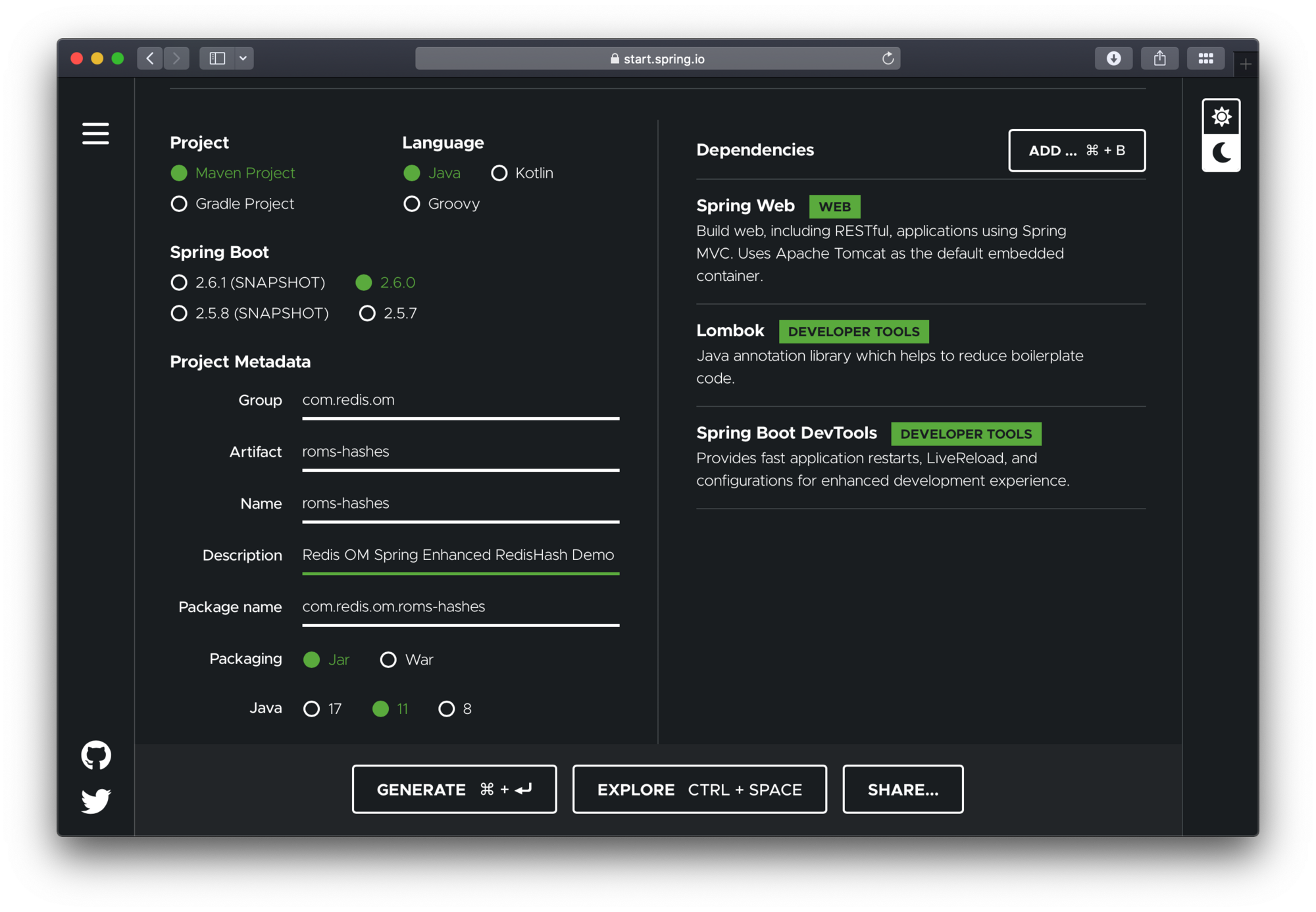
To configure the project:
- Navigate to [https://start.spring.io.](https://start.spring.io.) This service pulls in all the dependencies you need for an application and does most of the setup for you.
- Choose either Gradle or Maven and the language you want to use. This guide assumes that you chose Java.
- Click _Dependencies_ and select _Spring Web_, _Lombok_ and _Spring Boot DevTools_.
- Click _Generate_.
- Download the resulting ZIP file (`roms-hashes.zip`), which is an archive of a web application that is configured with your choices.
The dependencies included are:
- _Spring Web_: Build web/RESTful applications using Spring MVC. It will allow us to expose our app as a web service.
- _Lombok_: Java annotation library which helps to reduce boilerplate code.
- _Spring Boot DevTools_: Provides fast application restarts, LiveReload, and configurations for enhanced development experience.
> **NOTE**
>
> If your IDE has the Spring Initializr integration, you can complete this process from your IDE.
> **NOTE**
>
> You can also fork the project from Github and open it in your IDE or other editor.
### Adding Redis OM Spring
#### Maven
To use Redis OM Spring, open the `pom.xml` file and add the Redis OM Spring Maven dependency to the pom.xml file `dependencies` element:
```xml
com.redis.om
redis-om-spring
0.5.2-SNAPSHOT
```
> **NOTE**
>
> Please check the official [Redis OM Spring GitHub repository](https://github.com/redis/redis-om-spring) for the latest version information
#### Gradle
If using gradle add the dependency as follows:
```groovy
dependencies {
implementation 'com.redis.om.spring:redis-om-spring:0.1.0-SNAPSHOT'
}
```
### How do you enable Redis enhanced repositories?
The generated application contains a single Java file, the `@SpringBootApplication` annotated main application. To enable Spring Data Redis repositories, we also need to annotate the main or the configuration class with `@EnableRedisEnhancedRepositories` as well as the `@Configuration` annotation.
```java
package com.redis.om;
import org.springframework.boot.SpringApplication;
import org.springframework.boot.autoconfigure.SpringBootApplication;
import com.redis.om.spring.annotations.EnableRedisEnhancedRepositories;
@SpringBootApplication
@EnableRedisEnhancedRepositories(basePackages = "com.redis.om.hashes.*")
public class RomsHashesApplication {
public static void main(String[] args) {
SpringApplication.run(RomsHashesApplication.class, args);
}
}
```
### Launch Redis
The docker compose YAML file below can get started quickly. You can place at the root folder of your project and name it `docker-compose.yml`:
```yml
version: '3.9'
services:
redis:
image: 'redis:latest'
ports:
- '6379:6379'
volumes:
- ./data:/data
environment:
- REDIS_ARGS: --save 20 1
deploy:
replicas: 1
restart_policy:
condition: on-failure
```
To launch the docker compose application, on the command line (or via Docker Desktop), clone this repository and run (from the root folder):
```bash
docker compose up
```
Let's also launch an instance of the Redis CLI so that we can spy on what ROMS is doing. To do so we'll launch Redis in monitor mode:
```bash
redis-cli MONITOR
```
### Domain Entity
We'll have a single class in our application, the `User` class. We'll use lombok to avoid having to create getters and setters. We'll use the lombok annotations `@Data`, `@RequiredArgsConstructor` and `@AllArgsConstructor`.
Finally, to mark the class as a JSON document, we use the `@Document` annotation.
```java
package com.redis.om.hashes.domain;
import org.springframework.data.annotation.Id;
import org.springframework.data.annotation.Reference;
import org.springframework.data.redis.core.RedisHash;
import org.springframework.data.redis.core.index.Indexed;
import com.redis.om.spring.annotations.Bloom;
import lombok.AccessLevel;
import lombok.AllArgsConstructor;
import lombok.Data;
import lombok.NoArgsConstructor;
import lombok.NonNull;
import lombok.RequiredArgsConstructor;
@Data
@RequiredArgsConstructor(staticName = "of")
@AllArgsConstructor(access = AccessLevel.PROTECTED)
@NoArgsConstructor
@RedisHash
public class User {
@Id
private String id;
@Indexed @NonNull
private String firstName;
@Indexed
private String middleName;
@Indexed @NonNull
private String lastName;
@NonNull
@Indexed
String email;
}
```
We use Spring Data Redis `@RedisHash` annotation. The property named `id` is annotated with `org.springframework.data.annotation.Id`. Those two items are responsible for creating the actual key used to persist the Hash in Redis.
The `User` class has a `firstName`, `middleName` and `lastName`, as well as an `email` property.
```java
package com.redis.om.hashes.repositories;
import java.util.List;
import java.util.Optional;
import org.springframework.data.repository.CrudRepository;
import org.springframework.stereotype.Repository;
import com.redis.om.hashes.domain.User;
@Repository
public interface UserRepository extends CrudRepository {
}
```
### Pre-populating the Database
Let's add a few `User` POJOs to Redis on application start-up by modify the `RomsHashesApplication` class to include the newly created `UserRepository` using the `@Autowired` annotation. Then we'll use a `CommandLineRunner` `@Bean` annotated method to create four `User` POJOs and save them to the database.
In the `CommandLineRunner` we take the following steps:
- Use the repository `deleteAll` method to clear the database (be careful with this is production! 🙀)
- Create four `User` instances; we'll use the four band members of Rage Against the Machine.
- Use the repository `saveAll` method to save all `User` POJOs in bulk.
```java
package com.redis.om.hashes;
import java.util.List;
import org.springframework.beans.factory.annotation.Autowired;
import org.springframework.boot.CommandLineRunner;
import org.springframework.boot.SpringApplication;
import org.springframework.boot.autoconfigure.SpringBootApplication;
import org.springframework.context.annotation.Bean;
import org.springframework.context.annotation.Configuration;
import com.redis.om.hashes.domain.User;
import com.redis.om.hashes.repositories.UserRepository;
import com.redis.om.spring.annotations.EnableRedisEnhancedRepositories;
@SpringBootApplication
@Configuration
@EnableRedisEnhancedRepositories(basePackages = "com.redis.om.hashes.*")
public class RomsHashesApplication {
@Autowired
private UserRepository userRepo;
@Bean
CommandLineRunner loadTestData() {
return args -> {
userRepo.deleteAll();
User john = User.of("Zack", "de la Rocha", "zack@ratm.com");
User tim = User.of("Tim", "Commerford", "tim@ratm.com");
User tom = User.of("Tom", "Morello", "tom@ratm.com");
User brad = User.of("Brad", "Wilk", "brad@ratm.com");
userRepo.saveAll(List.of(john, tim, tom, brad));
};
}
public static void main(String[] args) {
SpringApplication.run(RomsHashesApplication.class, args);
}
}
```
Since we are using Spring Boot DevTools, if you already had the application running, it should have restarted/reloaded. If not, use the `mvn` command to launch the application:
```bash
./mvnw spring-boot:run
```
If every goes as expected, you should see the familiar Spring Boot banner fly by:
```bash
[INFO] --- spring-boot-maven-plugin:2.6.0-M1:run (default-cli) @ roms-documents ---
[INFO] Attaching agents: []
. ____ _ __ _ _
/\\ / ___'_ __ _ _(_)_ __ __ _ \ \ \ \
( ( )___ | '_ | '_| | '_ \/ _` | \ \ \ \
\\/ ___)| |_)| | | | | || (_| | ) ) ) )
' |____| .__|_| |_|_| |___, | / / / /
=========|_|==============|___/=/_/_/_/
:: Spring Boot :: (v2.6.0-M1)
2021-11-30 09:45:58.094 INFO 36380 --- [ restartedMain] c.r.o.d.RomsDocumentsApplication : Starting RomsDocumentsApplication using Java 11.0.9 on BSB.lan with PID 36380 (/Users/bsb/Code/module-clients/java/high-level/redis-om/redis-om-spring/demos/roms-documents/target/classes started by briansam-bodden in /Users/bsb/Code/module-clients/java/high-level/redis-om/redis-om-spring/demos/roms-documents)
```
### How does Redis OM Spring store hash data?
If you were watching the Redis CLI monitor you should have seen a barrage of output fly by. Let's break it down and inspect it using another Redis CLI so as to understand the inner workings of the system.
#### Redis search indexes
At the top you should have seen the `FT.CREATE` command which using the annotations in our POJO determined an index recipe. Since our POJO is annotated with `@Document` we get an index `ON JSON` against any keys starting with `com.redis.om.documents.domain.Company:` (which is the default key prefix for Spring Data Redis and also for ROMS):
```bash
1638336613.156351 [0 172.19.0.1:63396] "FT.CREATE" "UserIdx" "ON" "HASH" "PREFIX" "1" "com.redis.om.hashes.domain.User:" "SCHEMA" "firstName" "AS" "firstName" "TAG" "middleName" "AS" "middleName" "TAG" "lastName" "AS" "lastName" "TAG" "email" "AS" "email" "TAG"
```
ROMS uses the POJO fields annotated with `@Indexed` or `@Searchable` to build the index schema. In the case of the `User` POJO we have the fields `firstName`, `middleName`, `lastName` and `email` are all annotated as "indexable", meaning that we can do exact searches over these fields.
Spring Data Redis creates a SET to maintain primary keys for our entities, ROMS inherits this functionality from SDR. The `DEL` command following the index creation is triggered because of the call to `userRepo.deleteAll();` in our data loading method. If we had any saved objects already we would also see calls to delete those individual instances.
For each of the `User` POJO we should see a sequence of REDIS commands like:
```bash
1638340447.180533 [0 172.19.0.1:63398] "SISMEMBER" "com.redis.om.hashes.domain.User" "01FNTB6JWTQHMK7NTEYA8725MP"
1638340447.198702 [0 172.19.0.1:63398] "DEL" "com.redis.om.hashes.domain.User:01FNTB6JWTQHMK7NTEYA8725MP"
1638340447.200874 [0 172.19.0.1:63398] "HMSET" "com.redis.om.hashes.domain.User:01FNTB6JWTQHMK7NTEYA8725MP" "_class" "com.redis.om.hashes.domain.User" "email" "zack@ratm.com" "firstName" "Zack" "id" "01FNTB6JWTQHMK7NTEYA8725MP" "lastName" "de la Rocha"
1638340447.203121 [0 172.19.0.1:63398] "SADD" "com.redis.om.hashes.domain.User" "01FNTB6JWTQHMK7NTEYA8725MP"
```
First SDR checks whether the object already exists in the Redis SET of primary keys using the `SISMEMBER` command. Then, a `DEL` is issued to remove the Hash, following by a `HMSET` to write the new or udpated Hash. Finally, the `id` property of the object is addded to the primary keys set using the `SADD` command.
Let's inspect the data using the Redis CLI. We'll start by listing the keys prefixed with `com.redis.om.hashes.domain.User`:
```bash
127.0.0.1:6379> SCAN 0 MATCH com.redis.om.hashes.domain.User*
1) "0"
2) 1) "com.redis.om.hashes.domain.User:01FNTB6JWTQHMK7NTEYA8725MP"
2) "com.redis.om.hashes.domain.User:01FNTB6JZ2NSQNST3BBH1J1039"
3) "com.redis.om.hashes.domain.User:01FNTB6JYP4X15EAF08YBK55WR"
4) "com.redis.om.hashes.domain.User:01FNTB6JYXAZ6H7AJ9ZWHHW73H"
5) "com.redis.om.hashes.domain.User"
```
We have 5 matches, one for each of the `User` POJOs created plus the Redis SET for the primary keys. Let's inspect some of the values.
Let's check what type of data structure is stored in the `com.redis.om.documents.domain.Company` key:
```bash
127.0.0.1:6379> TYPE "com.redis.om.hashes.domain.User"
set
```
Knowing that it is a Redis SET, let inspect it's contents using the `SMEMBERS` command:
```bash
127.0.0.1:6379> SMEMBERS "com.redis.om.hashes.domain.User"
1) "01FNTB6JZ2NSQNST3BBH1J1039"
2) "01FNTB6JWTQHMK7NTEYA8725MP"
3) "01FNTB6JYXAZ6H7AJ9ZWHHW73H"
4) "01FNTB6JYP4X15EAF08YBK55WR"
```
The set contains all the Ids of our Users. Now, let's investigate the `com.redis.om.documents.domain.Company:01FNRW9V98CYQMV2YAB7M4KFGQ` key:
```bash
127.0.0.1:6379> TYPE "com.redis.om.hashes.domain.User:01FNTB6JWTQHMK7NTEYA8725MP"
hash
```
The Redis datatype stored is a `hash` (a Redis Hash). Let's check its contents using the `HGETALL` command:
```bash
127.0.0.1:6379> HGETALL "com.redis.om.hashes.domain.User:01FNTB6JWTQHMK7NTEYA8725MP"
1) "_class"
2) "com.redis.om.hashes.domain.User"
3) "email"
4) "zack@ratm.com"
5) "firstName"
6) "Zack"
7) "id"
8) "01FNTB6JWTQHMK7NTEYA8725MP"
9) "lastName"
10) "de la Rocha"
```
#### How do you query Redis hashes with repository methods?
ROMS most compelling feature is the ability to create repository implementations automatically, at runtime, from a repository interface.
Let's start with a simple method declaration in `UserRepository` that will find a unique instance of `User` given their lastname.
```java
package com.redis.om.hashes.repositories;
import java.util.Optional;
import org.springframework.data.repository.CrudRepository;
import org.springframework.stereotype.Repository;
import com.redis.om.hashes.domain.User;
@Repository
public interface UserRepository extends CrudRepository {
Optional findOneByLastName(String lastName);
}
```
ROMS uses the method name, parameters and return type to determine the correct query to generate and how to package and return a result.
`findOneByLastName` return an `Optional` of `User` this tells ROMS to return a null payload if the entity is not found. The `findOne` part also reinforces that even if there are multiple results we are only interested in getting one. ROMS parses the method name to detemined the number of expected parameters, the `ByLastName` portion of the method tell us we expect 1 single parameter named `lastName`.
#### Testing Controller
Let's create a REST controller to test the `findOneByLastName` method. Create the `UserController` under the package `com.redis.om.hashes.controllers` as shown:
```java
package com.redis.om.hashes.controllers;
import java.util.Optional;
import org.springframework.beans.factory.annotation.Autowired;
import org.springframework.web.bind.annotation.GetMapping;
import org.springframework.web.bind.annotation.PathVariable;
import org.springframework.web.bind.annotation.RequestMapping;
import org.springframework.web.bind.annotation.RestController;
import com.redis.om.hashes.domain.User;
import com.redis.om.hashes.repositories.UserRepository;
@RestController
@RequestMapping("/api/users")
public class UserController {
@Autowired
private UserRepository userRepository;
@GetMapping("name/{lastName}")
Optional byName(@PathVariable("lastName") String lastName) {
return userRepository.findOneByLastName(lastName);
}
}
```
In our controller, we include our `UserRepository` and create simple method to respond to a GET request at `/api/users/name/{lastName}` where `{lastName}` would be the string parameter we are passing as the `lastName` to find.
Let's test the endpoint using CURL and passing the exact company name `Redis`:
```bash
➜ curl --location --request GET 'http://localhost:8080/api/users/name/Morello'
{"id":"01FNTB6JYXAZ6H7AJ9ZWHHW73H","firstName":"Tom","middleName":null,"lastName":"Morello","email":"tom@ratm.com"}
```
Let's format the resulting JSON:
```json
{
"id": "01FNTB6JYXAZ6H7AJ9ZWHHW73H",
"firstName": "Tom",
"middleName": null,
"lastName": "Morello",
"email": "tom@ratm.com"
}
```
Inspecting the Redis CLI MONITOR we should see the query issued:
```bash
1638342334.137327 [0 172.19.0.1:63402] "FT.SEARCH" "UserIdx" "@lastName:{Morello} "
```
Let say that we wanted to find `Users` by the combination of `lastName` and `firstName`, we could add a query declaration to the repository interface like:
```java
List findByFirstNameAndLastName(String firstName, String lastName);
```
In this case method `findByFirstNameAndLastName` is parsed and the `And` keyword is used to determine that the method is expecting 2 parameters; `firstName` and `lastName`.
To test it we could add the following to our controller:
```java
@GetMapping("/q")
public List findByName(@RequestParam String firstName, @RequestParam String lastName) {
return userRepository.findByFirstNameAndLastName(firstName, lastName);
}
```
Using CURL to test we
```bash
➜ curl --location --request GET 'http://localhost:8080/api/users/q?firstName=Brad&lastName=Wilk'
[{"id":"01FNTE5KWCZ5H438JGB4AZWE85","firstName":"Brad","middleName":null,"lastName":"Wilk","email":"brad@ratm.com"}]
```
Formatting the resulting JSON we can see the record for `Brad Wilk` is returned as the only element of the JSON Array result:
```json
[
{
"id": "01FNTE5KWCZ5H438JGB4AZWE85",
"firstName": "Brad",
"middleName": null,
"lastName": "Wilk",
"email": "brad@ratm.com"
}
]
```
Back on the Redis CLI monitor we can see the query generated by our repository method:
```bash
1638343589.454213 [0 172.19.0.1:63406] "FT.SEARCH" "UserIdx" "@firstName:{Brad} @lastName:{Wilk} "
```
Redis OM Spring, extends Spring Data Redis with search capabilities that rival the flexibility of JPA queries by using Redis' native Search and Query engine.
## How do you map Java objects to Redis JSON with Redis OM Spring?
The JSON format has become ubiquitous as a data exchange format as well as a storage format, with many traditional relational databases now supporting JSON as a native format as well as a several document-oriented databases like CouchDB and MongoDB gaining in popularity. JSON as a data format eliminates the rigidity of relational database schemas, allow apps to evolve more naturally.
But did you know that Redis is a full-fledge document database supporting JSON natively? Redis supports JSON as a native Redis datatype and also supports indexing and searching. In this section we'll build a simple Document application using Redis OM Spring.
In this section, you will build an application that stores `Company` POJOs (Plain Old Java Objects) as JSON documents in Redis.
### Starting with Spring Initializr
We'll start by creating a base Spring Boot application using the [Spring Initializr](https://start.spring.io/). You can use this [pre-initialized project](https://start.spring.io/#!type=maven-project&language=java&platformVersion=2.6.0&packaging=jar&jvmVersion=11&groupId=com.redis.om&artifactId=roms-documents&name=roms-documents&description=Redis%20OM%20Spring%20Document%20Demo&packageName=com.redis.om&dependencies=web,lombok,devtools) and click Generate to download a ZIP file. This project is configured to fit the examples in this tutorial.
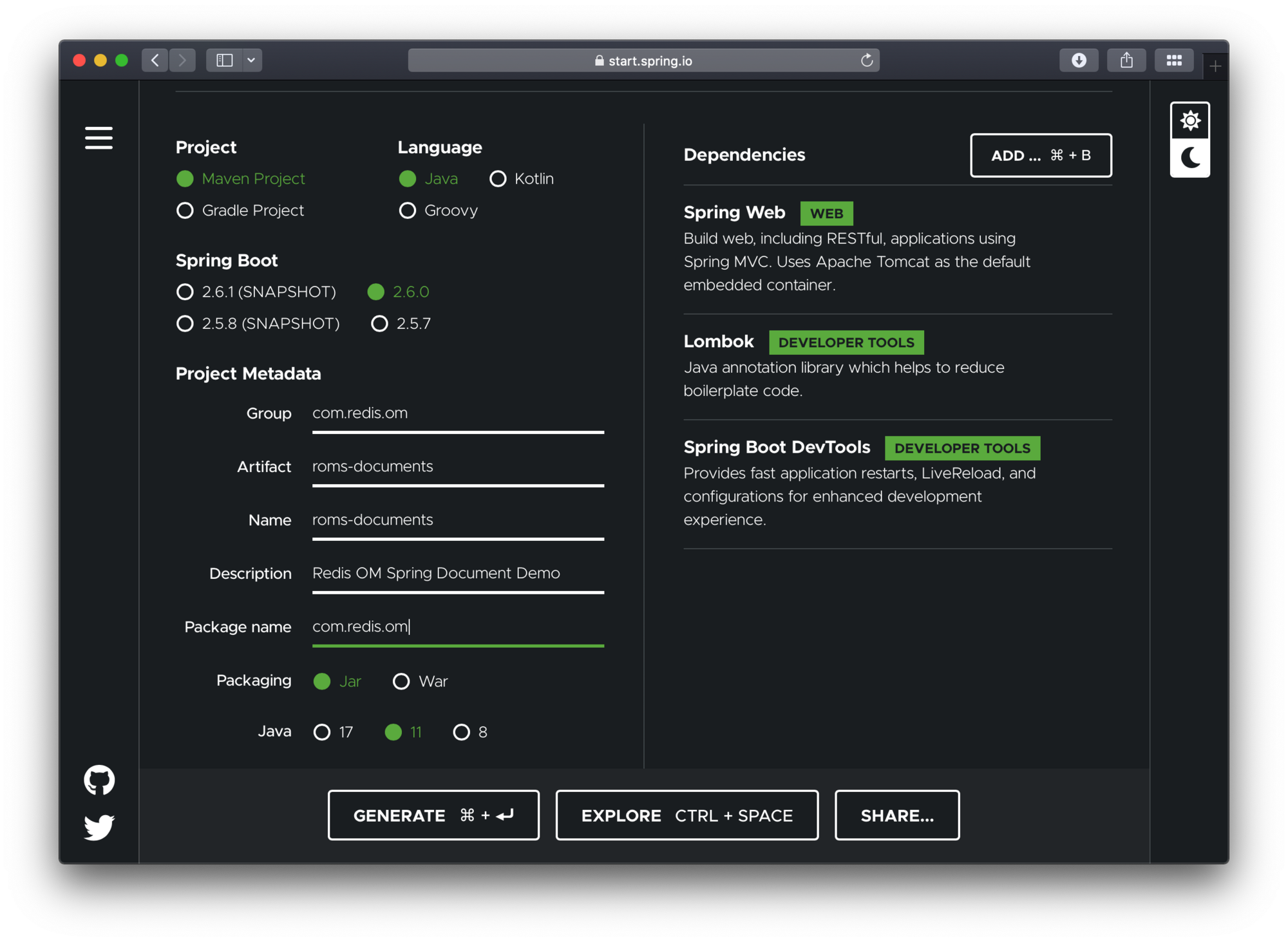
To configure the project:
- Navigate to [https://start.spring.io.](https://start.spring.io.) This service pulls in all the dependencies you need for an application and does most of the setup for you.
- Choose either Gradle or Maven and the language you want to use. This guide assumes that you chose Java.
- Click _Dependencies_ and select _Spring Web_, _Lombok_ and _Spring Boot DevTools_.
- Click _Generate_.
- Download the resulting ZIP file (`roms-documents.zip`), which is an archive of a web application that is configured with your choices.
The dependencies included are:
- _Spring Web_: Build web/RESTful applications using Spring MVC. It will allow us to expose our app as a web service.
- _Lombok_: Java annotation library which helps to reduce boilerplate code.
- _Spring Boot DevTools_: Provides fast application restarts, LiveReload, and configurations for enhanced development experience.
> **Note**
>
> If your IDE has the Spring Initializr integration, you can complete this process from your IDE.
> **Note**
>
> You can also fork the project from Github and open it in your IDE or other editor.
### Adding Redis OM Spring
#### Maven
To use Redis OM Spring, open the `pom.xml` file and add the Redis OM Spring Maven dependency to the pom.xml file `dependencies` element:
```xml
com.redis.om
redis-om-spring
0.5.2-SNAPSHOT
```
> **Note**
>
> Please check the official [Redis OM Spring GitHub repository](https://github.com/redis/redis-om-spring) for the latest version information
#### Gradle
If using gradle add the dependency as follows:
```groovy
dependencies {
implementation 'com.redis.om.spring:redis-om-spring:0.1.0-SNAPSHOT'
}
```
### How do you enable Redis document repositories?
The generated app contains a single file, the `@SpringBootApplications` annotated main application:
```java
package com.redis.om;
import org.springframework.boot.SpringApplication;
import org.springframework.boot.autoconfigure.SpringBootApplication;
@SpringBootApplication
public class RomsDocumentsApplication {
public static void main(String[] args) {
SpringApplication.run(RomsDocumentsApplication.class, args);
}
}
```
To enable the Redis Document Repositories we add the `@EnableRedisDocumentRepositories` which will allow us to use the `RedisDocumentRepository` class as the type of our Data Repositories.
```java
package com.redis.om;
import org.springframework.boot.SpringApplication;
import org.springframework.boot.autoconfigure.SpringBootApplication;
import com.redis.om.spring.annotations.EnableRedisDocumentRepositories;
@SpringBootApplication
@EnableRedisDocumentRepositories(basePackages = "com.redis.om.documents.*")
public class RomsDocumentsApplication {
public static void main(String[] args) {
SpringApplication.run(RomsDocumentsApplication.class, args);
}
}
```
### Launch Redis
The docker compose YAML file below can get started quickly. You can place at the root folder of your project and name it `docker-compose.yml`:
```yaml
version: '3.9'
services:
redis:
image: 'redis:latest'
ports:
- '6379:6379'
volumes:
- ./data:/data
environment:
- REDIS_ARGS: --save 20 1
deploy:
replicas: 1
restart_policy:
condition: on-failure
```
To launch the docker compose application, on the command line (or via Docker Desktop), clone this repository and run (from the root folder):
```bash
docker compose up
```
Let's also launch an instance of the Redis CLI so that we can spy on what ROMS is doing. To do so we'll launch Redis in monitor mode:
```bash
redis-cli MONITOR
```
### Domain entity
We'll have a single class in our application, the `Company` class. We'll use lombok to avoid having to create getters and setters. We'll use the lombok annotations `@Data`, `@RequiredArgsConstructor` and `@AllArgsConstructor`.
Finally, to mark the class as a JSON document, we use the `@Document` annotation.
```java
package com.redis.om.documents.domain;
import java.util.HashSet;
import java.util.Set;
import org.springframework.data.annotation.Id;
import org.springframework.data.geo.Point;
import org.springframework.data.redis.core.index.Indexed;
import com.redis.om.spring.annotations.Document;
import com.redis.om.spring.annotations.Searchable;
import lombok.AccessLevel;
import lombok.AllArgsConstructor;
import lombok.Data;
import lombok.NonNull;
import lombok.RequiredArgsConstructor;
@Data
@RequiredArgsConstructor(staticName = "of")
@AllArgsConstructor(access = AccessLevel.PROTECTED)
@Document
public class Company {
@Id
private String id;
@NonNull
@Searchable
private String name;
@Indexed
private Set tags = new HashSet();
@NonNull
private String url;
@NonNull
@Indexed
private Point location;
@NonNull
@Indexed
private Integer numberOfEmployees;
@NonNull
@Indexed
private Integer yearFounded;
private boolean publiclyListed;
}
```
Note that it has a `@Document` annotation on its type and a property named `id` that is annotated with `org.springframework.data.annotation.Id`. Those two items are responsible for creating the actual key used to persist the JSON document in Redis.
Our company POJO consists of a `name` and `url` `String` properties, a `Set` of `Strings` representing a set of `tags`, a `org.springframework.data.geo.Point` representing a Geo `location` for our company's headquarters, two `Integer`s for the `numberOfEmployees` and the `yearFounded` and a `boolean` as to whether the company is `publiclyListed`.
### Redis OM Spring document repositories
Working with Redis OM Spring document repositories lets you seamlessly convert and store domain objects in Redis JSON keys, apply custom mapping strategies, and use secondary indexes maintained by Redis.
To create the component responsible for storage and retrieval, we need to define a repository interface. The `RedisDocumentRepository` extends the familiar `PagingAndSortingRepository` from the core `org.springframework.data.repository` package.
Let's create a basic repository under `src/main/java/com/redis/om/documents/repositories` with the contents shown:
```java
package com.redis.om.documents.repositories;
import com.redis.om.documents.domain.Company;
import com.redis.om.spring.repository.RedisDocumentRepository;
public interface CompanyRepository extends RedisDocumentRepository {
}
```
The empty repository declaration is all we need to get basic CRUD functionality/pagination and sorting for our POJOs.
`CompanyRepository` extends the `RedisDocumentRepository` interface. The type of entity and ID that it works with, `Company` and `String`, are specified in the generic parameters on `RedisDocumentRepository`. By extending `PagingAndSortingRepository`, which itself extends `CrudRepository`, our `CompanyRepository` inherits several methods for working with Company persistence, including methods for saving, deleting, and finding Company entities.
### Pre-populating the database
Let's add a couple of `Company` POJOs to Redis so that we can have some data to play with and at the same time get to undertstand how ROMS serializes POJOs to JSON.
Modify the `RomsDocumentsApplication` class to include the newly created `CompanyRepository` using the `@Autowired` annotation. Then we'll use a `CommandLineRunner` `@Bean` annotated method to create two `Company` POJOs and save them to the database.
In the `CommandLineRunner` we take the following steps:
- Use the repository `deleteAll` method to clear the database (be careful with this is production! 🙀)
- Create two `Company` instances; one for Redis and one for Microsoft. Including name, URL, Geo Location, number of employees, year established, as well a set of tags.
- Use the repository `save` method passing each of the created POJOs.
```java
package com.redis.om.documents;
import java.util.Set;
import org.springframework.beans.factory.annotation.Autowired;
import org.springframework.boot.CommandLineRunner;
import org.springframework.boot.SpringApplication;
import org.springframework.boot.autoconfigure.SpringBootApplication;
import org.springframework.context.annotation.Bean;
import org.springframework.context.annotation.Configuration;
import org.springframework.data.geo.Point;
import com.redis.om.documents.domain.Company;
import com.redis.om.documents.repositories.CompanyRepository;
import com.redis.om.spring.annotations.EnableRedisDocumentRepositories;
@SpringBootApplication
@Configuration
@EnableRedisDocumentRepositories(basePackages = "com.redis.om.documents.*")
public class RomsDocumentsApplication {
@Autowired
CompanyRepository companyRepo;
@Bean
CommandLineRunner loadTestData() {
return args -> {
companyRepo.deleteAll();
Company redis = Company.of("Redis", "https://redis.io", new Point(-122.066540, 37.377690), 526, 2011);
redis.setTags(Set.of("fast", "scalable", "reliable"));
Company microsoft = Company.of("Microsoft", "https://microsoft.com", new Point(-122.124500, 47.640160), 182268, 1975);
microsoft.setTags(Set.of("innovative", "reliable"));
companyRepo.save(redis);
companyRepo.save(microsoft);
};
}
public static void main(String[] args) {
SpringApplication.run(RomsDocumentsApplication.class, args);
}
}
```
Since we are using Spring Boot DevTools, if you already had the application running, it should have restarted/reloaded. If not, use the `mvn` command to launch the application:
```bash
./mvnw spring-boot:run
```
If every goes as expected, you should see the familiar Spring Boot banner fly by:
```bash
[INFO] --- spring-boot-maven-plugin:2.6.0-M1:run (default-cli) @ roms-documents ---
[INFO] Attaching agents: []
. ____ _ __ _ _
/\\ / ___'_ __ _ _(_)_ __ __ _ \ \ \ \
( ( )___ | '_ | '_| | '_ \/ _` | \ \ \ \
\\/ ___)| |_)| | | | | || (_| | ) ) ) )
' |____| .__|_| |_|_| |___, | / / / /
=========|_|==============|___/=/_/_/_/
:: Spring Boot :: (v2.6.0-M1)
2021-11-30 09:45:58.094 INFO 36380 --- [ restartedMain] c.r.o.d.RomsDocumentsApplication : Starting RomsDocumentsApplication using Java 11.0.9 on BSB.lan with PID 36380 (/Users/bsb/Code/module-clients/java/high-level/redis-om/redis-om-spring/demos/roms-documents/target/classes started by briansam-bodden in /Users/bsb/Code/module-clients/java/high-level/redis-om/redis-om-spring/demos/roms-documents)
```
### How does Redis OM Spring store JSON document data?
If you were watching the Redis CLI monitor you should have seen a barrage of output fly by. Let's break it down and inspect it using another Redis CLI so as to understand the inner workings of the system.
### Redis search indexes
At the top you should have seen the `FT.CREATE` command which using the annotations in our POJO determined an index recipe. Since our POJO is annotated with `@Document` we get an index `ON JSON` against any keys starting with `com.redis.om.documents.domain.Company:` (which is the default key prefix for Spring Data Redis and also for ROMS):
```bash
1638291270.881079 [0 172.19.0.1:63378] "FT.CREATE" "CompanyIdx" "ON" "JSON" "PREFIX" "1" "com.redis.om.documents.domain.Company:" "SCHEMA" "$.name" "AS" "name" "TEXT" "$.tags[*]" "AS" "tags" "TAG" "$.location" "AS" "location" "GEO" "$.numberOfEmployees" "AS" "numberOfEmployees" "NUMERIC" "$.yearFounded" "AS" "yearFounded" "NUMERIC"
```
ROMS uses the POJO fields annotated with `@Indexed` or `@Searchable` to build the index schema. In the case of the `Company` POJO we have name propery annotated as "searchable" which means we get full-text search capabilities over that field. This is reflected in the schema field definition `$.name AS name TEXT`.
On the other hand the field `tags` is annotated as "indexable" which means we get an index field of type TAG, meaning that we can search for Companies by the exact value of the field. This is again, reflected in the schema field definition: `$.tags[*] AS tags TAG`
Spring Data Redis creates a SET to maintain primary keys for our entities, ROMS inherits this functionality from SDR. The `DEL` command following the index creation is triggered because of the call to `companyRepo.deleteAll();` in our data loading method. If we had any saved objects already we would also see calls to delete those individual instances.
```bash
1638291270.936493 [0 172.19.0.1:63378] "DEL" "com.redis.om.documents.domain.Company"
```
Finally, for each of the `Company` POJOs we should see a sequence of REDIS commands like:
```bash
1638291270.958384 [0 172.19.0.1:63378] "SISMEMBER" "com.redis.om.documents.domain.Company" "01FNRW9V98CYQMV2YAB7M4KFGQ"
1638291270.966868 [0 172.19.0.1:63378] "JSON.SET" "com.redis.om.documents.domain.Company:01FNRW9V98CYQMV2YAB7M4KFGQ" "." "{\"id\":\"01FNRW9V98CYQMV2YAB7M4KFGQ\",\"name\":\"Redis\",\"tags\":[\"reliable\",\"fast\",\"scalable\"],\"url\":\"https://redis.io\",\"location\":\"-122.06654,37.37769\",\"numberOfEmployees\":526,\"yearFounded\":2011,\"publiclyListed\":false}"
1638291270.970030 [0 172.19.0.1:63378] "SADD" "com.redis.om.documents.domain.Company" "01FNRW9V98CYQMV2YAB7M4KFGQ"
```
The first line checks whether the object already exists in the Redis SET of primary keys using the `SISMEMBER` command. Then, the `JSON.SET` commands is used to save the JSON serialization of the entity. Once that operation succeeds, the `id` property of the object is addded to the primary keys set using the `SADD` command.
Let's inspect the data using the Redis CLI. We'll start by listing the keys prefixed with `com.redis.om.documents.domain.Company`:
```bash
127.0.0.1:6379> SCAN 0 MATCH com.redis.om.documents.domain.Company*
1) "0"
2) 1) "com.redis.om.documents.domain.Company:01FNRW9V98CYQMV2YAB7M4KFGQ"
2) "com.redis.om.documents.domain.Company:01FNRW9V9VFNG0MQCJDXZPEG3H"
3) "com.redis.om.documents.domain.Company"
```
We have 3 matches, one for each of the `Company` POJOs created plus the Redis SET for the primary keys. Let's inspect some of the values.
Let's check what type of data structure is stored in the `com.redis.om.documents.domain.Company` key:
```bash
127.0.0.1:6379> TYPE "com.redis.om.documents.domain.Company"
set
```
Knowing that it is a Redis SET, let inspect it's contents using the `SMEMBERS` command:
```bash
127.0.0.1:6379> SMEMBERS "com.redis.om.documents.domain.Company"
1) "01FNRW9V9VFNG0MQCJDXZPEG3H"
2) "01FNRW9V98CYQMV2YAB7M4KFGQ"
```
The set contains all the Ids of our Companies. Now, let's investigate the `com.redis.om.documents.domain.Company:01FNRW9V98CYQMV2YAB7M4KFGQ` key:
```bash
127.0.0.1:6379> TYPE "com.redis.om.documents.domain.Company:01FNRW9V98CYQMV2YAB7M4KFGQ"
ReJSON-RL
```
The Redis datatype stored is a `ReJSON-RL` (a Redis JSON document). Let's check its contents using the `JSON.GET` command:
```bash
127.0.0.1:6379> JSON.GET "com.redis.om.documents.domain.Company:01FNRW9V98CYQMV2YAB7M4KFGQ"
"{\"id\":\"01FNRW9V98CYQMV2YAB7M4KFGQ\",\"name\":\"Redis\",\"tags\":[\"reliable\",\"fast\",\"scalable\"],\"url\":\"https://redis.io\",\"location\":\"-122.06654,37.37769\",\"numberOfEmployees\":526,\"yearFounded\":2011,\"publiclyListed\":false}"
```
With our new gained understanding of how ROMS serialized our `Company` POJOs, let's move on to expanding the powers of our `CompanyRepository` to go beyond CRUD.
### How do you create dynamic queries with Redis OM Spring?
ROMS most compelling feature is the ability to create repository implementations automatically, at runtime, from a repository interface.
Let's start with a simple method declaration in `CompanyRepository` that will find a unique instance of `Company` given the company name.
```java
package com.redis.om.documents.repositories;
import java.util.Optional;
// ... other imports ommitted ...
public interface CompanyRepository extends RedisDocumentRepository {
// find one by property
Optional findOneByName(String name);
}
```
ROMS uses the method name, parameters and return type to determine the correct query to generate and how to package and return a result.
`findOneByName` return an `Optional` of `Company` this tells ROMS to return a null payload if the entity is not found. The `findOne` part also reinforces that even if there are multiple results we are only interested in getting one. ROMS parses the method name to detemined the number of expected parameters, the `ByName` portion of the method tell us we expect 1 single parameter named `name`.
### Testing controller
Let's create a REST controller to test the `findOneByName` method. Create the `CompanyController` under the package `com.redis.om.documents.controllers` as shown:
```java
package com.redis.om.documents.controllers;
import java.util.Optional;
import java.util.Set;
import org.springframework.beans.factory.annotation.Autowired;
import org.springframework.web.bind.annotation.GetMapping;
import org.springframework.web.bind.annotation.PathVariable;
import org.springframework.web.bind.annotation.RequestMapping;
import org.springframework.web.bind.annotation.RestController;
import com.redis.om.documents.domain.Company;
import com.redis.om.documents.repositories.CompanyRepository;
@RestController
@RequestMapping("/api/companies")
public class CompanyController {
@Autowired
CompanyRepository repository;
@GetMapping("name/{name}")
Optional byName(@PathVariable("name") String name) {
return repository.findOneByName(name);
}
}
```
In our controller, we include our `CompanyRepository` and create simple method to respond to a GET request at `/api/companies/name/{name}` where `{name}` would be the string parameter we are passing as the `name` to find.
Let's test the endpoint using CURL by passing it the exact company name `Redis`:
```bash
➜ curl --location --request GET 'http://localhost:8080/api/companies/name/Redis'
{"id":"01FNRW9V98CYQMV2YAB7M4KFGQ","name":"Redis","tags":["reliable","fast","scalable"],"url":"https://redis.io","location":{"x":-122.06654,"y":37.37769},"numberOfEmployees":526,"yearFounded":2011,"publiclyListed":false}
```
Let's format the resulting JSON:
```json
{
"id": "01FNRW9V98CYQMV2YAB7M4KFGQ",
"name": "Redis",
"tags": ["reliable", "fast", "scalable"],
"url": "https://redis.io",
"location": {
"x": -122.06654,
"y": 37.37769
},
"numberOfEmployees": 526,
"yearFounded": 2011,
"publiclyListed": false
}
```
Inspecting the Redis CLI Monitor shows the resulting query:
```bash
1638344903.218982 [0 172.19.0.1:63410] "FT.SEARCH" "CompanyIdx" "@name:Redis "
```
Notice that you can use `redis` (all lowercase) or `rEdI` and you will get a match for `Redis`, if you go below 4 characters, say you try `red` or `RED` you will get no hits. Redis limits the minimun string match size to 4 characters to prevent potentially millions of results being returned.
#### How do you query geospatial data in Redis OM Spring?
ROMS supports GeoJSON types to store geospatial data. By using the `near` keyword in our queries, we tell ROMS to expect a `Point` (`org.springframework.data.geo.Point`) and a `Distance` (`org.springframework.data.geo.Distance`) types as parameters.
```java
// geospatial query
Iterable findByLocationNear(Point point, Distance distance);
```
Let's add a test endpoint to our controller for our Geo query:
```java
@GetMapping("near")
Iterable byLocationNear(//
@RequestParam("lat") double lat, //
@RequestParam("lon") double lon, //
@RequestParam("d") double distance) {
return repository.findByLocationNear(new Point(lon, lat), new Distance(distance, Metrics.MILES));
}
```
In our controller method we take 2 request parameters; latitude `lat`, longitude `lon` and a distance `d` (in miles). We use these values to contruct the `Point` and `Distance` needed for the repository `findByLocationNear` method.
Let's test the method with CURL, using a location near Redis' Mountain View headquarters:
```bash
➜ curl --location --request GET 'http://localhost:8080/api/companies/near?lat=37.384&lon=-122.064&d=30'
[{"id":"01FNRW9V98CYQMV2YAB7M4KFGQ","name":"Redis","tags":["reliable","fast","scalable"],"url":"https://redis.io","location":{"x":-122.06654,"y":37.37769},"numberOfEmployees":526,"yearFounded":2011,"publiclyListed":false}]
```
Formatting the JSON result we get a JSON array containing one entry: `Redis`.
```json
[
{
"id": "01FNRW9V98CYQMV2YAB7M4KFGQ",
"name": "Redis",
"tags": ["reliable", "fast", "scalable"],
"url": "https://redis.io",
"location": {
"x": -122.06654,
"y": 37.37769
},
"numberOfEmployees": 526,
"yearFounded": 2011,
"publiclyListed": false
}
]
```
Inspecting the Redis CLI Monitor shows the resulting query:
```bash
1638344951.451871 [0 172.19.0.1:63410] "FT.SEARCH" "CompanyIdx" "@location:[-122.064 37.384 30.0 mi] "
```
#### How do you use native Redis search queries?
There might be occasions where you just need to reach for the raw querying power of Redis (just like when you need raw SQL over JPA). For this scenario, we provide the `@Query` (`com.redis.om.spring.annotations.Query`) and the `@Aggregation` (`com.redis.om.spring.annotations.Aggregation`) annotations. These annotations expose the raw querying API provided by the `JRediSearch` library. ROMS adds parameter parsing and results mapping so you can use raw queries and aggregations in your repositories.
```java
// find by tag field, using JRediSearch "native" annotation
@Query("@tags:{$tags}")
Iterable findByTags(@Param("tags") Set tags);
```
Let's test it with CURL:
```bash
➜ curl --location --request GET 'http://localhost:8080/api/companies/tags?tags=reliable'
[{"id":"01FNTF7QKAGCQYMWWBV3044DHW","name":"Redis","tags":["reliable","fast","scalable"],"url":"https://redis.io","location":{"x":-122.06654,"y":37.37769},"numberOfEmployees":526,"yearFounded":2011,"publiclyListed":false},{"id":"01FNTF7QKXJ1CNZERHADN91YBR","name":"Microsoft","tags":["reliable","innovative"],"url":"https://microsoft.com","location":{"x":-122.1245,"y":47.64016},"numberOfEmployees":182268,"yearFounded":1975,"publiclyListed":false}]
```
Formatting the JSON we can see that the results include companies with the tag `reliable`:
```json
[
{
"id": "01FNTF7QKAGCQYMWWBV3044DHW",
"name": "Redis",
"tags": ["reliable", "fast", "scalable"],
"url": "https://redis.io",
"location": {
"x": -122.06654,
"y": 37.37769
},
"numberOfEmployees": 526,
"yearFounded": 2011,
"publiclyListed": false
},
{
"id": "01FNTF7QKXJ1CNZERHADN91YBR",
"name": "Microsoft",
"tags": ["reliable", "innovative"],
"url": "https://microsoft.com",
"location": {
"x": -122.1245,
"y": 47.64016
},
"numberOfEmployees": 182268,
"yearFounded": 1975,
"publiclyListed": false
}
]
```
Inspecting the Redis CLI Monitor we see the query that produced the results:
```bash
1638345120.384300 [0 172.19.0.1:63412] "FT.SEARCH" "CompanyIdx" "@tags:{reliable} "
```
#### Numeric queries
Just like other Spring Data based libraries, ROMS can handle a variety of queries using logic and numerical operators like `between`, `startingWith`, `greaterThan`, `lessThanOrEquals` and many more.
Below are some more examples of what's possible:
```java
// find by numeric property
Iterable findByNumberOfEmployees(int noe);
// find by numeric property range
Iterable findByNumberOfEmployeesBetween(int noeGT, int noeLT);
// starting with/ending with
Iterable findByNameStartingWith(String prefix);
```
## Next steps
Now that you've learned how to map Java objects to Redis hashes and JSON documents using Redis OM Spring, here are some resources to continue your journey:
- **[Getting Started with Redis and Java](/tutorials/develop/java/getting-started/)**: Learn the fundamentals of connecting to Redis from Java using the Jedis client library.
- **[Rate Limiting in Java with Redis](/tutorials/rate-limiting-in-java-spring-with-redis/)**: Build a rate limiter in a Spring Boot application using Redis.
- **[Redis OM Spring GitHub repository](https://github.com/redis/redis-om-spring)**: Explore the source code, find the latest version, and review additional examples.
- **[Redis Search documentation](https://redis.io/docs/latest/develop/interact/search-and-query/)**: Dive deeper into the search and query capabilities that power Redis OM Spring's indexing features.